


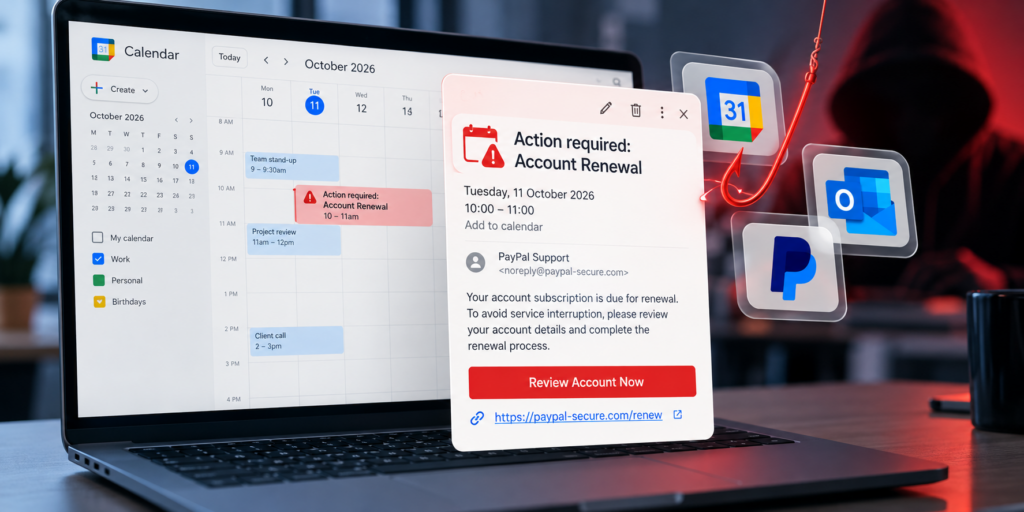
What Is Calendar Phishing?
Phishing attacks are no longer confined to suspicious emails landing in your inbox. Cybercriminals are increasingly exploiting another familiar part of the working day: your calendar.
A recent report by The Guardian, published on 11 October 2026, highlighted the growing threat of calendar phishing, in which fraudulent meeting invitations, payment notifications and subscription renewal reminders are used to trick people into revealing sensitive information.
According to the report, security researchers have observed significant growth in these attacks. Rather than relying exclusively on traditional phishing emails, attackers exploit calendar applications and the trust people place in their scheduled appointments and reminders.
The result is a convincing new route into business accounts, particularly when employees are busy, distracted or accustomed to accepting calendar invitations without questioning them.
For businesses, this is another reminder that effective cybersecurity requires more than an email filter. Employees need to recognise suspicious activity wherever it appears.
How Do Calendar Phishing Scams Work?
Calendar phishing uses familiar events and notifications to make fraudulent requests appear legitimate.
Attackers may exploit calendar features that automatically add invitations or events, depending on the user’s application and settings. A suspicious event can then appear alongside genuine meetings, making it easier for someone to mistake it for a legitimate appointment.
Common examples include:
1. Fake business meetings
An employee receives a calendar invitation for a meeting they do not remember arranging. The event description contains a link to a document, meeting room or project update.
Clicking the link takes the employee to a fraudulent website designed to capture their Microsoft 365 or Google Workspace login credentials.
2. Fake subscription renewals
A calendar event claims that a software subscription, cloud service or business account is due for renewal.
The notification may include a payment link or a telephone number for supposed customer support. The aim is to persuade the recipient to enter payment details, disclose account credentials or speak to a fraudulent support agent.
3. Fake payment notifications
Some invitations imitate familiar payment services, such as PayPal, and claim that a payment has been processed or that an account requires urgent attention.
The recipient is encouraged to click a link to dispute a transaction or contact a support team. Both routes can lead to credential theft or financial fraud.
4. Invitations from seemingly trusted services
Attackers can also exploit legitimate services used to create or distribute meeting invitations. An invitation that appears through a familiar platform is not necessarily trustworthy: the event content, sender or linked destination may still be malicious.
The common thread is social engineering. Instead of exploiting a software vulnerability, the attacker manipulates a person’s expectations and encourages them to take an unsafe action.
Why Are Calendar Phishing Attacks So Effective?
Calendar phishing works for many of the same reasons as traditional phishing, but the context can make the deception more convincing.
Familiarity creates trust. Employees are accustomed to seeing meetings, reminders and renewal notifications in their calendars. An unexpected event can appear less suspicious when it sits alongside genuine appointments.
The request looks routine. Reviewing a document, renewing a subscription or checking a payment is a normal business activity. Attackers exploit these everyday tasks to encourage quick decisions.
Employees are busy. People often check their calendars between meetings or while managing competing priorities. A convincing notification may receive less scrutiny than an unusual email.
Trusted brands are easy to imitate. Microsoft, Google and PayPal are familiar names in many workplaces. Attackers use that familiarity to make fraudulent requests appear credible.
Security controls can have blind spots. Traditional email security remains essential, but businesses should also consider how malicious links and invitations can reach employees through other channels.
Calendar phishing demonstrates an important principle: the apparent legitimacy of a message, application or notification should never replace independent verification.
How Can Businesses Protect Themselves?
Organisations should combine appropriate technical controls with practical security awareness training.
1. Review calendar security settings
Check how your organisation’s calendar applications handle invitations from unknown senders.
Where supported, configure settings to reduce the automatic addition or display of unsolicited invitations. Review external sharing and invitation policies, and ensure employees know how to report suspicious events.
The exact controls available will depend on the calendar platform and your organisation’s configuration.
2. Train employees to recognise suspicious invitations
Employees should treat unexpected calendar entries with the same caution as suspicious emails.
Encourage them to ask:
- Was I expecting this meeting, renewal or payment notification?
- Do I recognise the organiser and was I expecting contact from them?
- Is the event asking me to log in, provide payment details or contact an unfamiliar support number?
- Can I verify the request through a separate, trusted channel?
Unexpected requests for credentials or payment information should always be verified before action is taken.
3. Avoid clicking links in unexpected events
If a calendar invitation asks an employee to sign in to Microsoft 365, Google Workspace or another business service, they should navigate to the genuine website independently rather than following the supplied link.
The same principle applies to payment notifications and support telephone numbers. Employees should use contact details obtained from a trusted source.
4. Strengthen account security
Multi-factor authentication (MFA), strong authentication policies and appropriate access controls can reduce the impact of compromised passwords.
Where possible, organisations should use phishing-resistant authentication methods, such as passkeys or FIDO2 security keys, particularly for privileged accounts.
Security teams should also monitor suspicious sign-in activity and have a clear process for responding when an employee may have disclosed credentials.
5. Test employee awareness with phishing simulations
Security policies are only effective when employees understand and follow them.
Phishing simulations allow organisations to test how employees respond to realistic social engineering scenarios in a controlled environment. Results can identify where additional training is needed and help security teams measure improvements over time.
Importantly, simulations should cover more than obvious spelling mistakes and suspicious email addresses. Employees also need to recognise believable requests involving meetings, document sharing, payments and account renewals.
A well-designed awareness programme can help employees develop the habit of pausing, verifying and reporting before acting.
Why Phishing Simulations Matter for SMBs and MSPs
Small and medium-sized businesses are not immune to sophisticated phishing attacks. They may also have fewer dedicated security resources than larger organisations.
For managed service providers (MSPs), the challenge is multiplied across multiple customers, each with different users, configurations and levels of security awareness.
Regular phishing simulations can help businesses and MSPs:
- Identify vulnerabilities: Understand which users or teams are most likely to interact with suspicious messages.
- Improve security awareness: Provide targeted education based on observed behaviour.
- Measure progress: Track campaign results over time and assess whether training is improving outcomes.
- Support compliance: Produce evidence that security awareness activities form part of a wider cybersecurity programme, where relevant to the applicable framework.
- Scale protection: Establish repeatable testing across teams and customer environments.
The objective is not to catch employees out. It is to help people recognise attacks before a real incident occurs.
As phishing techniques evolve, awareness testing should evolve with them.
Protect Your Business with RapidPhish
Calendar phishing is another example of how attackers adapt familiar tools and everyday business processes to deceive employees.
While technical security controls remain essential, businesses should not assume that every malicious request will arrive as an obvious phishing email. Employees need regular opportunities to practise identifying suspicious messages and making safe decisions.
RapidPhish helps businesses and MSPs run phishing simulation campaigns without the complexity of traditional enterprise platforms.
With a pay-as-you-go approach, organisations can test employee awareness as needed, without committing to a long-term contract. MSPs can also use phishing simulations as part of a broader cybersecurity service for their customers.
Whether you are building your first security awareness programme or improving an established one, regular testing can help you understand where your organisation is exposed and where further training will have the greatest impact.
Ready to test your organisation’s phishing resilience?
Visit RapidPhish to explore phishing simulation campaigns and help your team build stronger security habits.
Frequently Asked Questions
What is calendar phishing?
Calendar phishing is a social engineering attack in which criminals use fraudulent calendar invitations, meeting descriptions or renewal reminders to persuade victims to click malicious links, disclose credentials or make payments.
Can Google Calendar and Microsoft Outlook be used in phishing attacks?
Yes. Attackers can exploit the way users interact with calendar invitations and event descriptions across different platforms. The risk depends on the attack method, application features and user settings. Receiving an invitation through a legitimate service does not automatically make its contents trustworthy.
How can employees identify a calendar phishing attack?
Employees should be cautious of unexpected invitations, urgent payment requests, unfamiliar support numbers and links asking them to sign in. They should verify suspicious requests independently and report them to their IT or security team.
Can phishing simulations help prevent calendar phishing?
Phishing simulations can improve employees’ ability to recognise social engineering techniques and respond safely. Organisations should include realistic scenarios covering different communication channels, while ensuring simulations are authorised and appropriately designed.
How often should businesses run phishing simulations?
There is no universal schedule that suits every organisation. Regular testing throughout the year, combined with targeted training and reviews of campaign results, can help businesses maintain awareness as attack techniques change.
Source and further reading: The Guardian — “‘You have a meeting’: the calendar phishing scam growing exponentially” (11 October 2026).